Tools Needed
Prior to performing this procedure, you will need to have the following tools:
- Phillips screwdriver
Powering Down the Auto Sentry flex
WARNING: Failure to turn off the Auto Sentry increases the risk of serious bodily injury or death;
and also, may cause the credit card reader to go into a tamper state and if that happens, the credit card reader will have to be replaced.
- On the site server desktop, click on the VNC icon for the Auto Sentry flex.
- On the menu bar, click the Windows Flag icon.
- Click the Shutdown button.
- Wait until the Auto Sentry flex display goes to a white screen.
- With the hex key, open the rear doors of the Auto Sentry flex.
- Turn off the power switch inside the Auto Sentry head.
- Turn off both breakers inside the Auto Sentry head by pressing the blue buttons on the breakers until they click out.
- Turn off the breaker inside the Auto Sentry base by pressing the blue button on the breaker until it clicks out.
- Shut off the electricity to the Auto Sentry by turning off the Auto Sentry breaker inside the ICS® power distribution box.
Replacing Coin Hopper Board
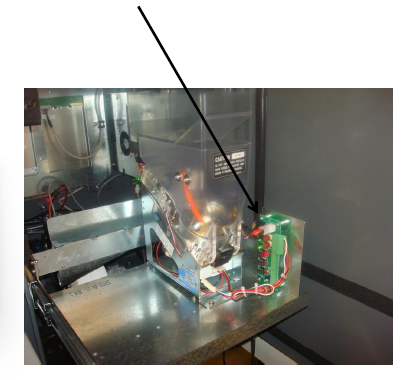
- Remove the power and communication cables from the board.
- Remove the terminal blocks from coin hoppers from board. Please note, if you have multiple coin dispensers please, label which ones go in which ports so they are installed back into their proper location.
- Remove coin hopper board by removing the (4) Phillips head screws securing it to mounting studs.
- Install new board with (4) Phillips head screws and reconnect all cabling.
Instructions to Power Up the Auto Sentry flex
- Turn on the electricity to the Auto Sentry Flex by turning on the Auto Sentry breaker inside the ICS power distribution box.
- Turn the breakers on inside the Auto Sentry flex by pressing the blue buttons on the breakers until they click in.
- Inside the Auto Sentry flex, turn on the power switch to boot the system.
- Test coin hopper(s) by dispensing coins from the customer diagnostic screen.
Please contact ICS Technical Support if any assistance is needed:
800-246-3469
INSTR0005
Comments
0 comments
Article is closed for comments.